Support
CS Colect Connector
Retrieved orders from Colect are available in the Colect Sales Orders list with the Status ‘imported’ can processed manually or via a scheduled job to a regular sales order.
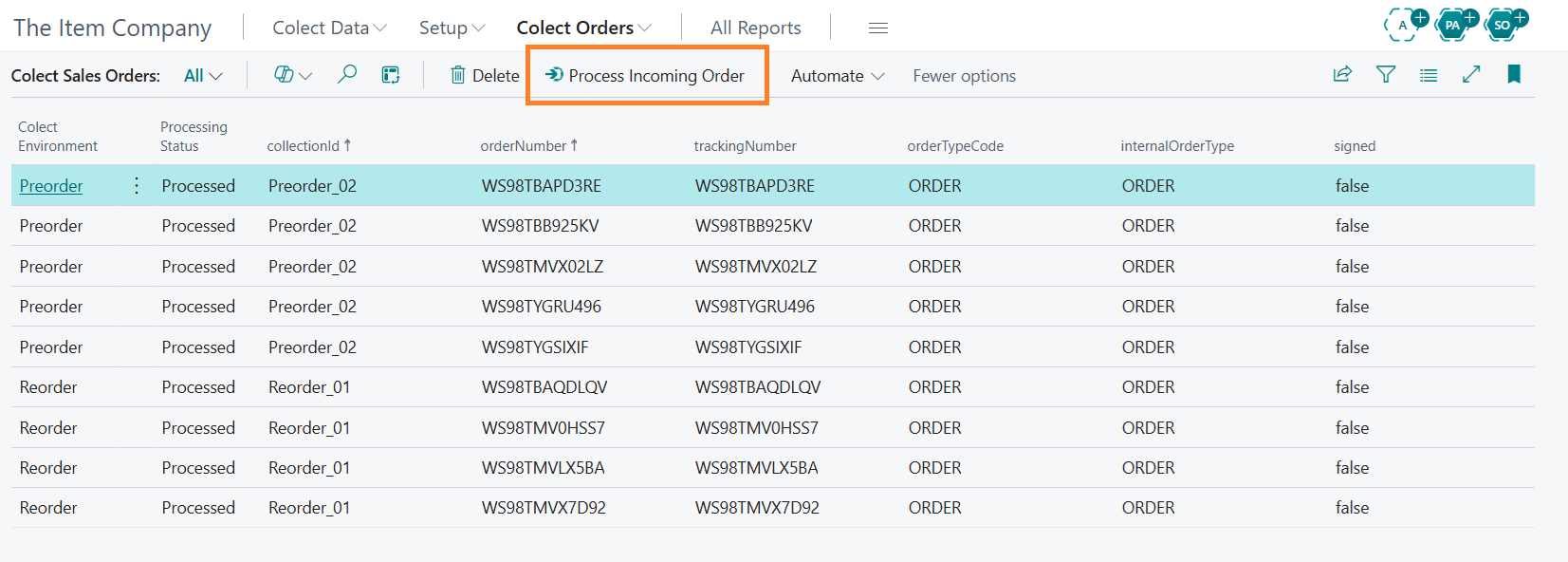
A Colect sales order can be viewed and modified if needed by opening the Colect Sales order card page. All order information as provided by Colect will be visible on the Colect Sales
order page.
Colect Sales orders have a Processing Status.
The status indicates if an order has been processed or not. In case of any error, the error message is displayed on the Colect sales order card page. A Colect sales order can be modified or deleted
and reprocessed if required.
Processing Colect sales orders can be scheduled in the job queue with codeunit 70798902. All orders with status Imported or Error will be in scope for (re-)processing.
Colect Sales Orders are processed with a sequence number from the number series set in the CS Colect Setup. The new sales orders will have the status Open.
Common error messages appear if:
- A sales order with a Colect order number already exists;
- A sales person cannot be found in Business Central with the corresponding e-mail
address;
- A customer is blocked for delivery;
- An item is blocked for sales.
The role center contains tiles for the Colect Sales order table.
Central Solutions
Strijdakker 17 | 5673 TN | Nuenen (NL)
Chamber of Commerce 75296497
VAT ID NL860227790B01
support@central-solutions.nl
+31 85 401 73 40