Create Location Codes for the delivery points (locations) for your purchase orders.
For example: If the Incoterm is ‘Free on Board Harbour Shanghai’, create a Location ‘Harbour Shanghai’ and use this location code in your purchase order.
The Incoterm ‘Cost and Freight Antwerpen’ needs a Location ‘Antwerpen harbour’ for usage in purchase orders.
Note:
For new locations the Inventory account no. must also be defined in the Inventory Posting Setup.
If a location contains a default destination location, the Destination Code will be inherited from the location card. The destination code can be changed per order and per order line:

The purchase line will also display the Expected Receipt Date on the Destination Location. This date is calculated from the Expected Receipt Date on the purchase location with the Shipping
Time added from the transfer route:

Note:
This is an estimated receipt date on the destination location, because the final date may be different depending on the receipt date of the transfer order. The transfer order can be entered for
posted receipts in the Transfer-From Location.
On the purchase line, a Transfer Order can be selected where the received items must be moved to after posting the receipt of the purchase order in the current location.

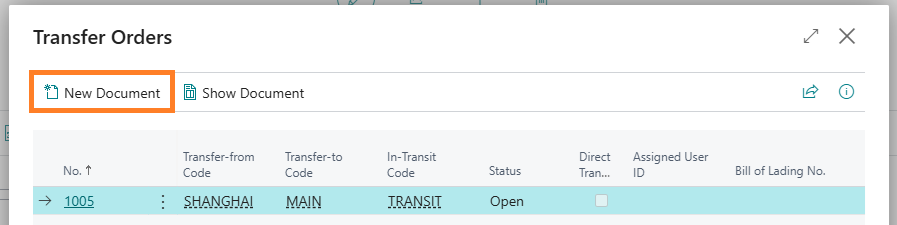
The selection page will display the current transfer orders with the same Transfer-from Location and Transfer-to Location as the purchase order that you navigate from. Select New Document to create a new transfer order if required:
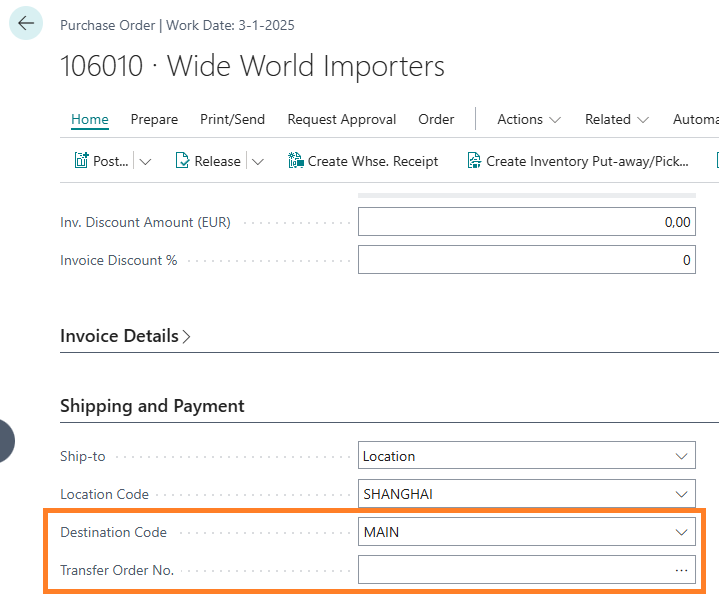
The Destination Code and the Transfer Order No. may also be entered on the purchase order header (Tab Shipping and Payment). They will be inherited on the purchase lines:
The purchase order can be posted on the moment that the vendor delivers the items to the specified location. Microsoft 365 Business Central will create Item Ledger entries with the Remaining Quantity in the specified location.
On the Item Ledger entry, the Source Document Type, Source Document No. and the Destination Code will be visible:

Central Solutions
Strijdakker 17 | 5673 TN | Nuenen (NL)
Chamber of Commerce 75296497
VAT ID NL860227790B01
support@central-solutions.nl
+31 85 401 73 40