
Support
CS GS1 Barcode Management
CS GS1 Barcode management is setup on the page CS GS1 Barcode Management Setup.
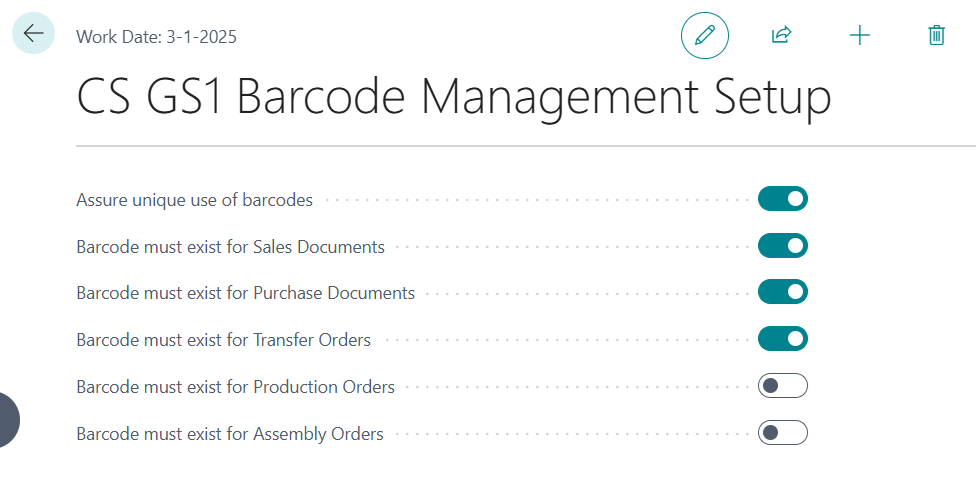
The following settings are made:
Assure unique use of barcodes:
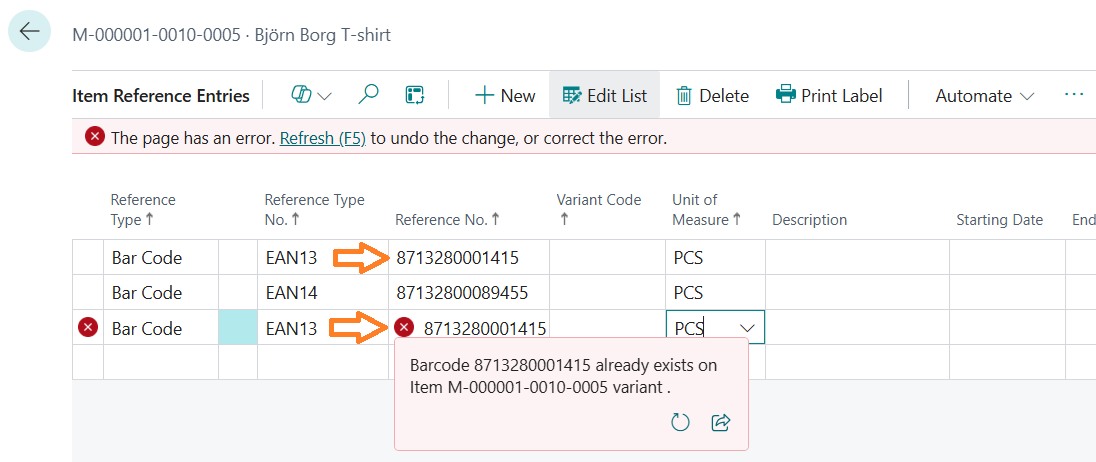
If this switch is turned on, CS GS1 Barcode Management will not allow the use of barcode numbers more than once. You will see an error message if you assign an existing barcode number manually to a different item, variant or unit of measure:
Barcodes will be visible in the sales line.
Barcode must exist for Purchase Documents:
If this switch is turned on, CS GS1 Barcode Management will check if a barcode exists for items, variants and units of measure that you use in purchase documents (orders, invoices, return orders, etc.).
Barcodes will be visible in the purchase line.
Barcode must exist for Transfer Orders:
If this switch is turned on, CS GS1 Barcode Management will check if a barcode exists for items, variants and units of measure that you use in Transfer orders.
Barcodes will be visible in the transfer line.
Barcode must exist for Production Orders:
If this switch is turned on, CS GS1 Barcode Management will check if a barcode exists for items, variants and units of measure that you use in Production orders.
Note:
This function will only work in the Premium version of Microsoft 365 Business Central.
Barcode must exist for Assembly Orders:
If this switch is turned on, CS GS1 Barcode Management will check if a barcode exists for items, variants and units of measure that you use in Assembly orders.
Central Solutions
Strijdakker 17 | 5673 TN | Nuenen (NL)
Chamber of Commerce 75296497
VAT ID NL860227790B01
support@central-solutions.nl
+31 85 401 73 40